Have you ever spent hours crafting the perfect email campaign, only to watch it end up in the spam folder?
Nearly 1 in 6 marketing emails never reach the inbox. This means that the messages in your emails are getting lost before anyone even sees them.
Email deliverability matters because it directly differentiates between the campaigns that win and those that don’t.
This article examines what email deliverability is, why it matters, and the 11 best practices to improve your email deliverability rates, so that your next campaign doesn’t land in the spam folder.
What Is Email Deliverability & Why Does It Matter?
Email deliverability is a metric that measures whether your emails land in the inbox. This is different from the delivery rate. Delivery rate only measures whether the email has reached the recipient’s email address or not.
Think of delivery as getting your email to your building, while deliverability is getting it past the lobby and onto your desk.
If your emails land in spam or promotions folders, the users never notice them. People read emails that land in their inbox and have eye-catching subject lines. If your emails don’t land there, then your engagement rate decreases.
Currently, B2B emails see around 98.16% delivery rate, but that doesn’t mean all those emails reach the primary inbox where people read them. Industry data shows the average inbox placement rate is around 77%.
Why does this email deliverability rate matter?
The primary reason is your reputation.
Your sender reputation decides where your emails will land. The email service providers track every email you send. They monitor bounce rates, spam complaints, and engagement signals. One poor campaign damages your reputation for months, and your emails might not land in inboxes due to this.
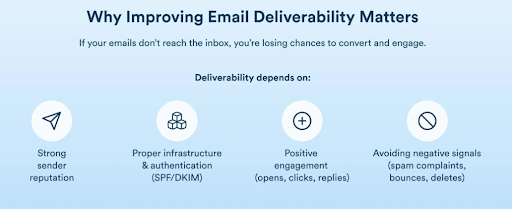
Other reasons are:
- Maximizes ROI & Revenue: Your emails reach inboxes if the deliverability rate is high. This drives opens, clicks, and conversions.
- Ensures Critical Communication: A reliable delivery guarantees that the important transactional emails are sent to users on time.
- Meets Provider Regulations: If you have strong deliverability, then it helps you comply with the authentication and anti-spam rules of the mail service providers.
- Enables Data-Driven Optimization: Tracking deliverability helps clean lists, improve targeting, and increase engagement.
11 Best Practices to Improve Your Email Deliverability
1. Authenticate Your Email Domain
Email authentication is the first crucial step. It proves that you are a legitimate sender to the inbox providers. If you don’t authenticate your email domain, then your real business emails can appear suspicious. Therefore, the emails you send may end up in spam folders.
The following three protocols can help you verify your identity:
- SPF specifies which servers are allowed to send emails on your behalf.
- DKIM adds a digital signature to ensure your message hasn’t been altered.
- DMARC connects SPF and DKIM and provides reports on unauthorized email activities.
The process of setting it up typically takes an hour. Log in to your domain registrar and copy the authentication records from your email service provider. Then enter them as TXT records in your DNS settings. Most services provide step-by-step instructions on how to go about it.
For instance, if your domain name is yourcompany.com and you are using an email service such as Mailchimp, they may provide you with records like:
- SPF Record:
v=spf1 include:mailchimp.com ~all - DKIM Record:
k=rsa; p=MIIBIjANBgkq… (provided by your email tool) - DMARC Record:
v=DMARC1; p=none; rua=mailto:dmarc@yourcompany.com
You only need to copy these and paste them into your DNS management interface as TXT records. After all the verifications are complete, your email providers will know that you have a reputable and legitimate domain.
2. Build and Maintain Clean Email Lists
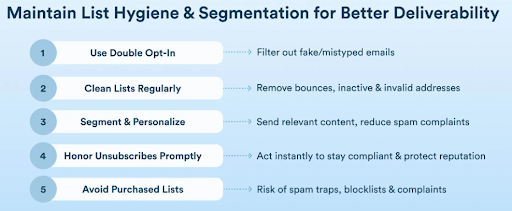
Buying an email list is a common shortcut that many people take to increase their sales instantly. But it does not work like that. It’s a fast track to spam folders and blacklists.
Ensure that people are interested in what you are offering, and therefore, they are giving you their email addresses. This will increase the chances that users will open your emails and engage with them.
Delete the email addresses that don’t exist or have permanent errors. Sending to these email addresses will affect your sender reputation.
3. Segment Your Audience for Targeted Campaigns
Sending the same email to everyone on your list reduces engagement rates. The reason is that these email marketing campaigns lack personalization.
Personalized emails get opened, clicked, and replied to. And this improves the sender’s reputation and deliverability.
You can segment your list based on purchase history, browsing activity, email activity, geography, or source of sign-up. A person who purchased from you last week requires different content than a person who hasn’t opened an email in three months. Sending them the same email is a waste of your chance to reach both.
This same segmentation logic applies across other channels, too. For example, if you’re running PropellerAds Telegram Mini App ads alongside your email campaigns, your audience segments should stay consistent. This ensures that users get the same messaging whether they encounter your brand in their inbox or inside a Telegram Mini App.
Segmentation also extends beyond email content. When subscribers click through to your website or landing page, the experience should match the promise made in your email. This is where responsive web design becomes critical. A segmented audience clicking a link in your email should land on a page that’s optimized for their device and aligned with the email’s message.
A professional web design service can help you create fast and mobile-friendly websites that seamlessly connect with your email campaigns. This ensures that users get a cohesive experience from inbox to conversion.
4. Monitor Your Sender Reputation
Your sender reputation helps determine whether inbox providers trust you enough to deliver your emails to the primary inbox.
Tools like SenderScore give you a score between 0 and 100. This score is based on factors like spam complaints, invalid recipients, and authentication setup. You have to check your score regularly to ensure that everything is going well.
Similarly, BarracudaCentral and MXToolbox offer free reputation monitoring and blacklist checking. You need to set up alerts so that if your IP address or domain is blacklisted, then you know that immediately. The faster you catch problems, the less damage they cause because you can solve them instantly.
5. Optimize Your Email Content
There are some words or sentences that might land your emails in spam. Terms such as “free money,” “limited time offer,” or extensive use of exclamation marks feel spammy.
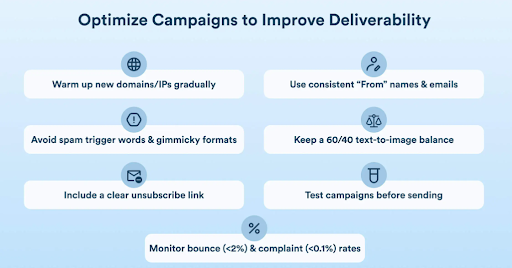
Balance your text-to-image ratio carefully. Aim for at least 60% text to avoid spam triggers from image-heavy designs. Your mail should be understandable even if the images do not load.
Also, always include a plain text version of your email alongside the HTML version. Some email clients prefer plain text, and having both versions signals that you’re following best practices. Most email service providers create this automatically, but verify that they do.
6. Personalize Beyond the First Name
Personalizing emails based on the first name has been a common practice.
But real personalization should go beyond it. It is done when behavioral data is used to send emails. With this data, the content of the mail is written in such a way that hooks the user and persuades them to open the mail.
For example, if someone is searching for winter jackets on your website, send them winter jacket recommendations.
7. Maintain Consistent Sending Patterns
Mailbox providers are sensitive to volume spikes. Increasing from 500 to 5,000 emails in a short period without proper warm-up can hurt deliverability. The inbox providers will notice the sudden increase in volume and start marking your emails as spam until they confirm that you are not a hacker.
Create a routine of sending emails and maintain it. If you are sending newsletters on a weekly basis, send them every week at the same time. This will help you gain the trust of your subscribers as well as the inbox providers.
When you do need to increase volume, warm up gradually. If you are adding a new IP address or expanding your list, send your emails in gradually increasing volumes over a period of weeks. Start with your most active subscribers who are likely to open and click on your emails, and then move on to the less active ones.
8. Make Unsubscribing Easy
Hiding your unsubscribe link doesn’t keep subscribers. It just frustrates them into marking you as spam, which destroys your sender reputation.
Place a clear unsubscribe link in every email. Ideally, the link is placed at the footer of the mail as people expect it to be there. Make the process one click with no login required. When someone wants to unsubscribe, it will make that process easy for them.
This will improve deliverability. People who don’t want your emails won’t engage with them. This will create an impact on your metrics as well. It’s better to have a smaller list of engaged subscribers than a large list full of people who ignore or report you.
9. Re-Engage or Remove Inactive Subscribers
The subscriber who hasn’t opened an email in the past six months might not open your mail again. Continuing to send emails to them reduces your engagement metrics. This is a signal to the inbox providers that people don’t want your content.
To get their attention back, run a re-engagement campaign. Design this campaign for the subscribers who haven’t interacted recently. Ask them if they want to hear from you.
Wait for a few weeks for them to re-engage. If they still don’t respond to your emails, remove them from your list. After every 6 months, clean your lists so that you only have an audience who is genuinely interested in your brand.
10. Test Before You Send
Make sure you preview the emails you send on different platforms. The reason behind this is that Gmail displays emails differently from Outlook. Mobile devices show content differently than desktop. What looks perfect in your email builder might break completely in an inbox.
Use spam score testing tools to determine whether your email will land in the spam folder or not. These tools analyze your content and predict whether your email is spammy.
11. Monitor and Analyze Performance Metrics
 (Image Source)
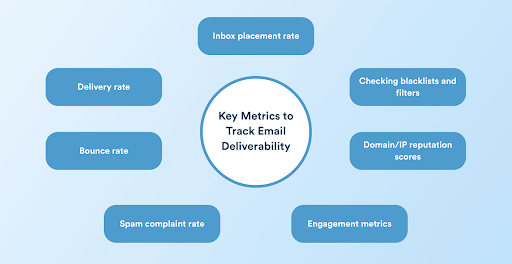
You can track metrics like inbox placement rate, open rate, click rate, bounce rate, and spam complaint rate after every campaign to increase the deliverability rate.
Set up feedback loops with major ISPs like Gmail, Yahoo, and Microsoft. These feedback loops notify you when someone marks your email as spam.
Conduct regular deliverability audits to identify trends. Ask yourself:
- Are open rates declining gradually?
- Is one segment bouncing more than others?
- Are certain campaigns triggering more spam complaints?
Ensure Long-Term Email Deliverability Success
Email deliverability isn’t something you fix once and forget. It requires ongoing attention. The best practices we discussed above are designed to help you build and maintain trust with inbox providers.
Each improvement compounds and gradually moves more of your emails from spam folders into your primary inboxes.
So, are you ready to improve your email deliverability? Try Writecream for free and start creating high-performing emails that consistently land in inboxes.