

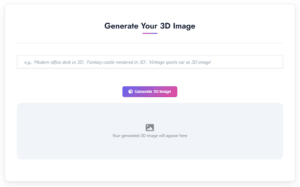
Writecream 3D Image Generator
]In today's digital-first world, visuals play a crucial role in grabbing attention, telling stories, and enhancing user experience. Whether you're a graphic designer, marketer, educator, or content creator, adding a 3D twist to your images can elevate your work from flat to fantastic. But the question is-how do you do that without expensive software or advanced technical skills?
The answer is simpler than you think: a free 3D Image Generator tool like the one from Writecream.
In this blog, we'll walk you through what 3D image generation is, why you should care about it, and how you can easily create high-quality 3D visuals online in minutes.
Why Use a 3D Image Generator?
Before diving into the how, let's talk about the why.
3D images provide depth, realism, and an interactive feel that 2D graphics often lack. They can:
Meet Writecream's Free 3D Image Generator Tool
Writecream, known for its AI-powered tools, now offers a 3D Image Generator Tool that lets anyone-from beginners to professionals-create stunning 3D visuals in just a few clicks.
What makes it stand out?
Whether you want a 3D avatar, a product mockup, or an abstract design, this tool makes the magic happen-all online. Even leading hardware design companies now use quick 3D renders like these to preview product concepts before committing to full prototyping.
How to Use Writecream's 3D Image Generator: A Step-by-Step Guide
Creating 3D images has never been this simple. Follow these steps to turn your ideas into 3D visual art:
Step 1: Visit the Tool
Head over to the official Writecream 3D Image Generator. The interface is clean, and there's no need to sign up immediately making it accessible even for first-time users.
Step 2: Describe Your Image
You'll see a prompt area asking you to type in your desired image description. Be specific. For example:
The more details you provide, the better the AI can visualize it.
Step 3: Generate the Image
Click the "Generate- button and wait a few seconds. The tool will process your input and create a 3D-styled image that matches your description. Depending on the complexity, this usually takes under a minute.
Step 4: Preview & Download
Once generated, you can preview your image. If it looks good, just hit Download to save it. If not, you can tweak your prompt and regenerate until you get the perfect result.
Who Can Use This Tool?
The beauty of Writecream's 3D Image Generator lies in its versatility. It's useful for:
You don't need any design background. If you can describe what you want, the AI takes care of the rest.
Start Creating Your Own 3D Masterpieces Today
We're living in an era where AI is removing creative roadblocks. With Writecream's 3D Image Generator Tool, there's no reason to limit your imagination. Whether you're aiming for realism, fantasy, or abstract designs, this free online tool lets you create 3D images quickly and beautifully-without a learning curve or a price tag.
Join Writecream for FREE!
In a few clicks and under 30 seconds, generate cold emails, blog articles, LinkedIn messages, YouTube videos, and more — no credit card required.
Start for FREE