
Image Denoise: Transform Photos Instantly with WriteCream AI
Use our Image Denoise tool to transform your noisy photos into clean, clear images with our advanced AI denoiser. This free, user-friendly tool helps you denoise images, improve clarity, and enhance details in seconds - perfect for photographers, designers, and content creators.
Image Denoiser

Drag & Drop Your Image Here
or
Supports JPG, PNG, WEBP (Max 20MB)
Denoising your image...
Original Image
Denoised Image
Your Denoising History
AI Headshot Generator
Create stunning AI headshots with professional lighting and background. Perfect for LinkedIn, social media, and professional profiles.

AI Tattoo Generator
Generate realistic tattoos with AI. Choose from various styles and designs for your next tattoo.

Portrait Enhancer
Enhance your photos with AI-powered portrait enhancement. Perfect for professional headshots and portraits.

Unblur Image
Remove blur from images to enhance clarity and visibility. Perfect for photos and documents.
Other Tools

AI Comedy Story Generator
Turn your ideas into hilarious stories! Create witty narratives and side-splitting tales with our AI-powered comedy generator.

AI Horror Story Generator
Create terrifying horror stories, haunted narratives, and nightmarish tales with our AI-powered horror story generator.

AI to Humanizer Tool
Transform AI-generated text into natural, human-like content. Bypass AI detection and make your writing more engaging and relatable.
AI Image Generator
Create stunning, high-quality images and eye-catching visuals in seconds. Perfect for social media, marketing, and creative projects.

Study Guide Generator
Create comprehensive study guides with key concepts, summaries, and practice questions. Perfect for students and educators.
UI to Code Converter
Transform your UI designs into clean, production-ready code instantly. Get pixel-perfect HTML and CSS with AI-powered conversion.
AI Comedy Story Generator
Turn your ideas into hilarious stories! Create witty narratives and side-splitting tales with our AI-powered comedy generator.
AI Horror Story Generator
Create terrifying horror stories, haunted narratives, and nightmarish tales with our AI-powered horror story generator.
AI to Humanizer Tool
Transform AI-generated text into natural, human-like content. Bypass AI detection and make your writing more engaging and relatable.
AI Image Generator
Create stunning, high-quality images and eye-catching visuals in seconds. Perfect for social media, marketing, and creative projects.
Study Guide Generator
Create comprehensive study guides with key concepts, summaries, and practice questions. Perfect for students and educators.
UI to Code Converter
Transform your UI designs into clean, production-ready code instantly. Get pixel-perfect HTML and CSS with AI-powered conversion.
The Fastest Image Denoise Tool Available
Our professional Image Denoise solution helps clean up your noisy photos and transform them into clear, professional-quality images in seconds. Our AI technology automatically denoises images while preserving important details for perfect results every time.
Try now - no sign up requiredProfessional Image Denoise Service
Our advanced Image Denoise technology lets you enhance images while preserving details and sharpness. Perfect for photographers, designers, and content creators who need clean, professional images without the noise.
Try now - no sign up required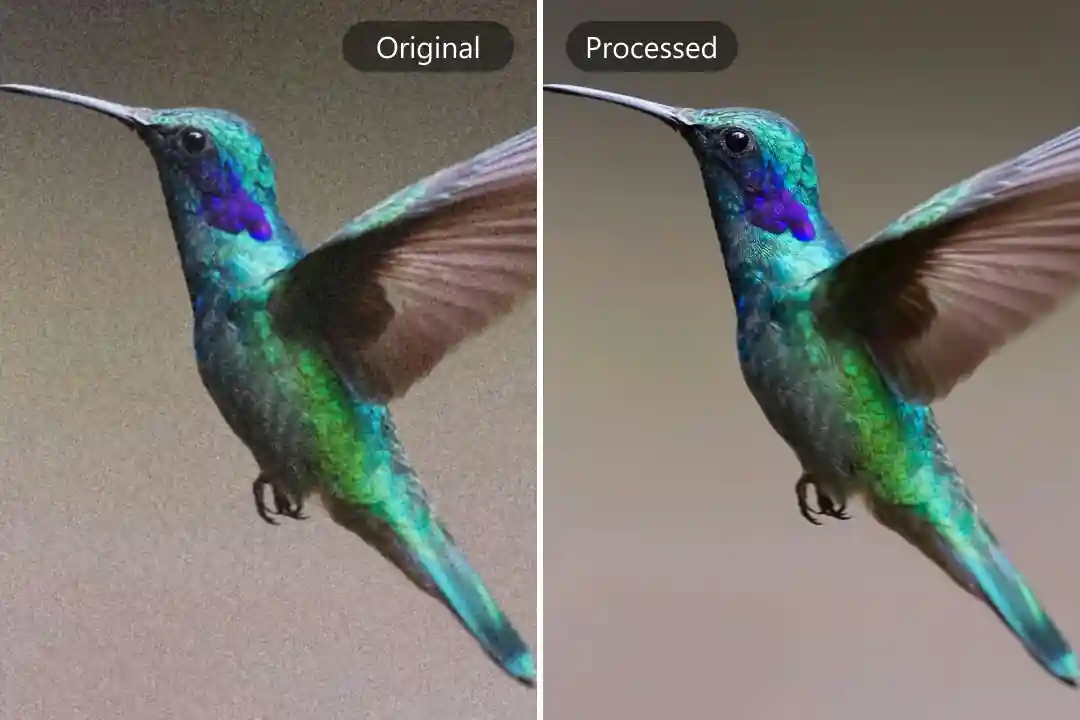
Why Choose WriteCream AI's Image Denoiser?
AI-Powered Denoising
Our advanced AI automatically detects and removes noise while preserving important details to give you clean, clear images.
Crystal Clear Results
Specialized algorithms remove noise and grain while maintaining image sharpness and detail for professional results.
Free & No Signup
Enjoy unlimited access to professional image denoising with no sign-up required—ideal for photographers and designers.
How It Works: Denoise Images in Three Simple Steps
Upload Your Image
Drag and drop or browse to upload the image you want to denoise. We support JPG, PNG, and WEBP formats.
AI Denoises Image
Our AI automatically analyzes and removes noise while preserving important details and sharpness.
Download Clean Image
Click "Download" and receive your noise-free, professional-quality image instantly. Perfect for portfolios and publications.
Key Features of WriteCream AI's Image Denoiser
Noise Reduction
Effectively removes grain, speckles, and digital noise from your images.
Detail Preservation
Maintains sharpness and important details while removing unwanted noise.
Adaptive Processing
Intelligently adjusts to different noise levels and image types for optimal results.
Color Accuracy
Preserves true colors while cleaning up noise and grain.
Multiple Formats
Save your denoised images in various formats like JPG, PNG, or WEBP.
Mobile Friendly
Denoise images directly from your smartphone—perfect for on-the-go editing.
Benefits of Using WriteCream AI's Image Denoiser
Photography
Rescue low-light or high-ISO photos by removing digital noise and grain.
Graphic Design
Clean up scanned images or low-quality assets for professional designs.
Save Money
No need for expensive editing software—get pro results with our free tool.
Easy to Use
Our tool is designed for everyone—no learning curve, just clean images instantly.
Who Can Benefit from WriteCream AI's Image Denoiser?
Photographers
Clean up high-ISO or low-light shots for professional portfolios.
Designers
Prepare clean images for websites, presentations, and marketing materials.
Researchers
Enhance scientific images by removing noise while preserving data.
Content Creators
Improve image quality for blogs, social media, and digital content.
Learn More About Image Noise Reduction
Remove Grain from Photos Instantly with WriteCream’s AI Image Noise Remover
We’ve all been there. You snap what should’ve been a perfect photo—maybe it’s a dreamy sunset, a late-night selfie, or a once-in-a-lifetime event—but when you check it later, it’s full of grainy fuzz. Disappointing, right? That grain, often called image noise, is a common problem, especially in low-light or zoomed-in shots. It makes even your best moments look blurry, dull, and low-quality. But guess what? You no longer need expensive editing software or complicated tools to fix it.
Read Remove Grain from Photos Instantly with WriteCream's AI Image Noise RemoverHow AI Image Noise Removers Enhance Photo Quality Instantly
Ever snapped what you thought was the perfect photo—great angle, perfect lighting, maybe even a magical moment—only to zoom in and find it covered in weird little specks or grainy fuzz? Yep, we’ve all been there. That annoying static-like effect is called “image noise,” and it loves to sneak into photos taken in low light or with a zoom lens. It’s frustrating, especially when everything else about the picture feels just right.
Read How AI Image Noise Removers Enhance PhotoImage Noise Remover by WriteCream: Enhance Photo Clarity Like a Pro
Image noise remover tools are a must-have in today’s visual world. Have you ever snapped what felt like the perfect photo, only to look at it later and realise it’s grainy or blurry? That frustrating fuzz is known as image noise, and it has a sneaky way of ruining even your best shots. Whether you’re a content creator, photography enthusiast, social media pro, or someone who simply loves sharing clear, scroll-stopping pictures, photo clarity matters—and that’s exactly where an image noise remover makes all the difference.
Read Image Noise Remover by WriteCreamFrequently Asked Questions
What types of image noise can this tool remove?
Our tool effectively removes various types of noise including high-ISO digital noise, grain from film scans, compression artifacts, and color noise. It works well with photos taken in low light conditions.
Will noise removal affect my image quality?
Our AI is designed to remove noise while preserving important details and sharpness. The result is a cleaner image with maintained quality, often appearing sharper because distracting noise has been removed.
How does this compare to professional editing software?
While professional software offers more controls, our AI provides comparable noise reduction results with just one click. It's perfect for users who want professional-quality results without complex editing workflows.
How long does it take to remove noise from an image?
Processing time depends on image size, but most images are cleaned within seconds. You'll get professional results almost instantly without waiting for complex processing.
Is there a limit to how many images I can process?
No, our free tool allows you to process unlimited images with no watermarks or restrictions. You can clean as many photos as you need.
Can I use the cleaned images for commercial purposes?
Yes! Cleaned images can be used for portfolios, websites, publications, and other commercial purposes. You retain all rights to your original and cleaned images.
Image Denoise: Remove Noise Instantly
Get clean, professional-quality images with our advanced Image Denoise technology. Perfect for photographers, designers, and content creators—completely free with no registration required!

