Imagine you want to write a story, but instead of just telling the story, you want it to show up on the first page when people search for it on Google. Thats way harder than just writing words. You have to work out what people are typing into Google, which stories already rank the first page, and what kind of words and concepts Google likes the most.
This can become confusing very fast for beginners. Most people end up opening many tools, clicking many tabs, and guessing what to include and what not to include. They wonder things like: “Should I talk about benefits first? Or should I add examples? What words matter?” These questions make writing for search engines feel complicated.
The Writecream SEO Editor, with help from Lexi AI Agent, aims to eliminate that confusion. Rather than letting you guess, it presents the actual queries people have and what Google already ranks highly. It helps you figure out what to include in your article and what things you can skip. It even helps you organize your writing so that search engines understand your content easily, all inside one tool.
In this tutorial, you will learn what the Writecream SEO Editor is, how Lexi AI helps you at every step, what happens when you start a research project, how the tool connects research with writing, and how you can confidently use it even if this is your first SEO tool ever.
When Should You Use the Writecream SEO Editor?
You should use the Writecream SEO Editor whenever your goal is to rank on Google.
It is useful when you are writing a new blog post and want it to be SEO-friendly from the start. It is also helpful when you already have content but it is not ranking or getting traffic. If you want to understand why competitors are ranking higher than you, this tool helps with that as well.
The SEO Editor is especially useful if you don’t want to manage many tools at the same time. Instead of using one tool for keywords, another for competitors, and another for writing, everything is done in one place.
In simple words, if you care about search traffic, this tool is made for you.
Step-by-Step Guide: Getting Started with Writecream SEO Editor
Step 1: Opening the Writecream SEO Editor
To begin, you need to access the SEO Editor through your Writecream account.
- Log in to your Writecream dashboard
- Navigate to the SEO tools section
- Open the Lexi AI Agent and SEO Editor using this link:
https://app.writecream.com/seo-query
Once you’re on this page, you’ll see the Lexi AI interface, which serves as the starting point for all SEO research and content creation.
At this stage, you are not writing anything. You are simply telling the tool what topic you want to rank for.

Step 2: Understanding the Role of Lexi AI Agent
Before using the tool, it is important to understand what Lexi AI does.
Lexi AI is not just a writing tool. It is more like a smart helper that studies Google for you.
- Analyzes Google’s top-ranking search results
- Identifies patterns in competitor content
- Understands user search intent
- Finds content gaps and opportunities
- Prepares SEO insights that guide the editor and AI writer
You don’t need to understand SEO terms to use Lexi. Just know this:
Lexi helps decide what your content should include so Google understands it better.
Step 3: Starting Your First SEO Research
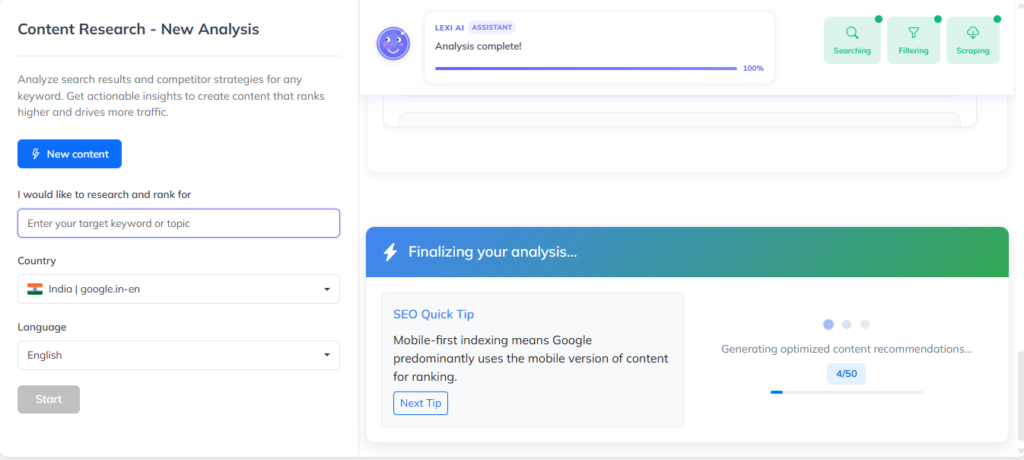
To begin using the SEO Editor, you must first start a new research session.
- Click on “New Research”
- Enter your target keyword (for example: coffee vs tea benefits)
- Select the country where you want to rank
- Select the language
- Click “Start”
That’s it. You don’t need to adjust anything else.

Step 4: How Lexi AI Analyzes Search Results
After clicking Start, Lexi AI begins its work.
You will see a loading or progress screen. This usually takes a few minutes. During this time, you don’t need to do anything. Just wait.
Behind the scenes, Lexi is:
- Checking top Google search results
- Studying competitor articles
- Finding common topics and headings
- Understanding search intent
- Preparing SEO guidance for your article
This step is very important because everything you see later in the editor depends on this research.
Step 5: Reviewing the Analysis Results
Once the research is complete, Lexi shows you an overview of what it found.
You may see:
- Websites that are currently ranking
- Topics commonly discussed
- Patterns in content structure
Do not worry if this looks overwhelming. You are not expected to analyze everything manually.
This section exists to show that your content plan is based on real Google data, not guesses. The editor will automatically use this research when guiding your writing.
You can simply review it briefly and move forward.

Step 6: Moving from Research to Writing
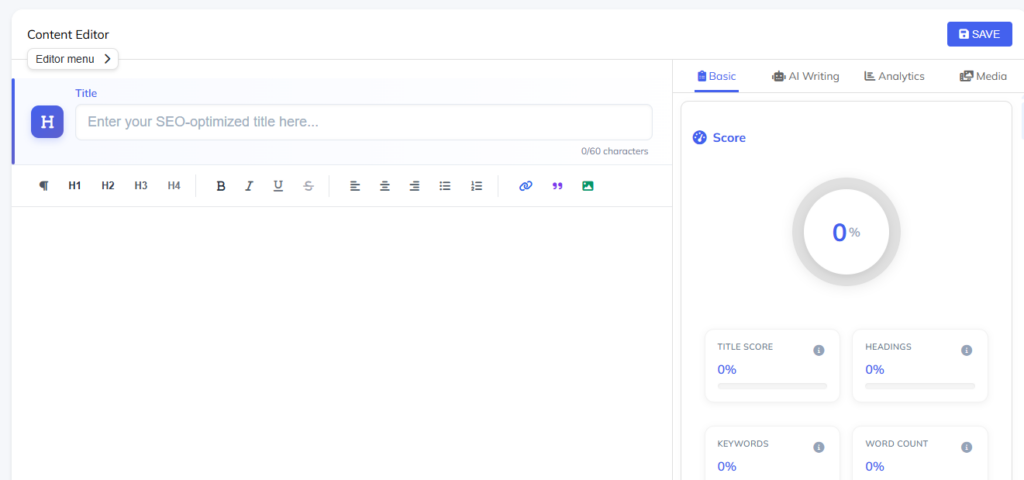
After reviewing the research, you will see a button that says “Start Writing Article.”
Clicking this takes you to the main SEO Editor.
This is where you actually write your content. The editor uses Lexi’s research to:
- Show SEO suggestions
- Calculate an SEO score
- Guide what to include next
From this point onward, you are writing with direction, not guessing.
What Makes the Writecream SEO Editor Easy for Beginners?
The biggest advantage of the Writecream SEO Editor is that it explains things while you write.
You don’t have to remember SEO rules. The editor shows you what to improve, where to add more content, and how to structure your article better.
You can write manually, use AI to help generate sections, or edit everything in your own words. You are always in control.
The tool is designed to guide you, not confuse you.
Simple Tips for First-Time Users
- It’s best to always initially go through Lexi AI research before putting down any words.
- Don’t try to perfect your work in the first attempt; instead, keep refining it gradually.
- Instead of following Lexi’s insights as unchangeable regulations, treat them more like suggestions.
- First, concentrate on being of help to the reader and the SEO will take its course.
- Go over the content created by AI and then, contribute with your knowledge.
Common Mistakes to Avoid
One common mistake is skipping the research step and jumping straight into writing. This removes the biggest advantage of the SEO Editor.
Another mistake is blindly following every suggestion without considering relevance. Use the SEO score and insights thoughtfully rather than mechanically.
Finally, avoid publishing without reviewing content for accuracy, tone, and originality.

Conclusion
The Writecream SEO Editor with Lexi AI is made for people who want to rank on Google without becoming SEO experts.
Instead of guessing what to write or copying competitors blindly, you get a clear path from research to writing to optimization.
If you are new to SEO, this tool gives you confidence. If you already write content, it saves time and removes uncertainty.
Ready to get started? Try the Writecream SEO Editor for free: https://app.writecream.com/seo-query
Start your first SEO research today and see how Lexi AI helps you write content that’s built to rank.