Creating SEO Titles, Meta Descriptions & Outlines Using Lexi AI Agent
Introduction
To get clicks from Google, it is not enough to simply achieve a good ranking — your SEO title and meta description must be compelling enough to grab attention in a crowded search results page, and your content outline must be clearly structured so that both users and search engines can easily understand your page. SEO titles, meta descriptions, and content outlines work together as a powerful combination that improves your click-through rate, enhances readability, strengthens content flow, and boosts your overall search performance.
With the Lexi AI Agent inside the Writecream SEO Editor, this entire process becomes simple, systematic, and fully data-driven. Instead of spending hours brainstorming different title ideas, rewriting meta descriptions multiple times, or struggling to create a logical outline, Lexi AI analyzes top-ranking competitor pages and identifies proven patterns. It then automatically suggests SEO-optimized titles, persuasive meta descriptions, and high-performing content structures that are aligned with what Google and users already prefer.
This means you no longer have to rely on guesswork. You can confidently create content that not only ranks higher in search results but also attracts more clicks, keeps readers engaged for longer, and improves the overall quality and effectiveness of your articles.
Why SEO Titles, Meta Descriptions & Outlines are Important
- SEO titles decide whether users click your result or ignore it.
- Meta descriptions influence your click-through rate by explaining the page value in a short summary.
- Content outlines help Google understand your page structure and improve indexing.
- Well-planned headings improve readability and user experience.
- Proper outlines make long articles easier to write and organize.
- Optimized titles and descriptions improve your visibility in competitive search results.
When Should You Create SEO Titles, Meta Descriptions & Outlines?
You should use this feature:
- Before publishing any new blog or landing page.
- When your existing pages are ranking but getting very few clicks.
- While updating old content to improve CTR and engagement.
- When planning long-form articles that require a clear content flow.
- When targeting competitive keywords and niches.\
Step-by-Step Guide: How to Create SEO Titles, Meta Descriptions & Outlines with Lexi AI
Step 1: Open the Writecream SEO Editor
To begin creating SEO titles, meta descriptions, and content outlines, first open the SEO Editor from your Writecream account.
Follow these steps:
- Log in to your Writecream dashboard
- Go to the SEO Tools section
- Open the Lexi AI Agent & SEO Editor using this link:
👉 https://app.writecream.com/seo-query
Once the page opens, you will see the Lexi AI interface. This is where the complete process of generating SEO titles, meta descriptions, and structured outlines starts.
At this stage, you are not writing the article yet. You are preparing the foundation of your content by allowing Lexi AI to study search results, competitor pages, and ranking patterns.

Step 2: What Lexi AI Agent Does for You
Before you start writing, it is important to understand how Lexi AI supports your work. Lexi AI is not just a writing tool — it works as a complete SEO planning assistant.
Lexi AI helps you by:
- Analyzing top-ranking competitor titles and meta descriptions
- Studying how headings and outlines are structured
- Understanding what users expect from the topic
- Suggesting click-friendly SEO titles
- Generating optimized meta descriptions
- Building high-performing content outlines based on real SERP data
You can think of Lexi AI as your personal SEO strategist that prepares everything before you begin writing.
Step 3: Start Your Research Session
To create SEO titles and outlines, you must start a new research session.
Follow these steps:
- Click on “New Research”
- Enter your main keyword (example: free AI tools for students)
- Select your target country
- Choose your content language
- Click on “Start”
Choosing the correct country and language ensures that Lexi AI analyzes Google results that match your real audience.
Once you click on start, Lexi AI will begin scanning the top-ranking Google pages for your keyword. It collects important data and insights that help you create content that matches user intent and performs better in search results.
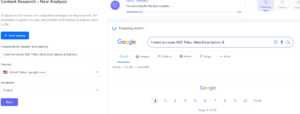
Step 4: How Lexi AI Analyzes Titles & Meta Descriptions
Once the research starts, Lexi AI scans Google search results and competitor pages.
Behind the scenes, Lexi AI:
- Studies competitor title patterns
- Identifies emotional triggers and power words
- Checks what type of titles are ranking
- Understands user intent behind the keyword
- Prepares multiple SEO-optimized title suggestions
- Generates meta descriptions that match search intent and improve CTR
This step is very important because all the next stages, including content writing and optimization, are based on this research. It ensures that your content is created using real, well-researched data instead of guesswork.
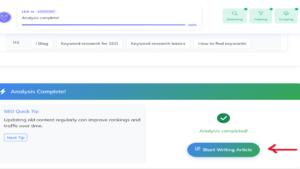
Step 5: Create Your Content Outline
After the analysis is complete, Lexi AI prepares a structured content outline.
It automatically suggests:
- Main headings (H1, H2, H3)
- Logical content flow
- Important topics competitors are covering
- Missing sub-topics you can add for better ranking
This outline becomes your article roadmap and helps you write faster with better structure.
Step 6: Start Writing Your Content
After reviewing the suggestions, click on “Start Writing Article.”
Now you move from research mode to writing mode.
At this stage:
- SEO titles and meta descriptions appear inside the editor
- Your article outline is already structured
- Your SEO score updates in real time
- Optimization tips guide you while writing
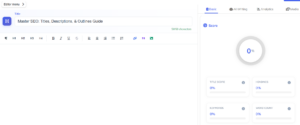
Understanding the SEO Editor Layout
Once inside the SEO Editor, you will see different sections:
- Editor Area – Write and edit your content
- SEO Score Panel – Shows your optimization score in real time
- Analysis Tabs – Keyword analysis, AI writing tools, media, and analytics
- Suggestions Panel – Displays improvement tips based on competitor data
All updates happen instantly as you write.
Tips for Best Results
- Use Lexi AI-generated titles as a base and personalize them slightly.
- Keep meta descriptions under 160 characters.
- Follow the suggested outline for better content flow.
- Write naturally and focus on user value.
- Review titles and descriptions before publishing.
Mistakes to Avoid
- Writing generic titles without emotional appeal.
- Ignoring meta descriptions completely.
- Creating articles without a proper outline.
- Stuffing keywords unnaturally into titles.
- Publishing content without checking CTR potential.
Conclusion
Creating SEO titles, meta descriptions, and outlines using the Lexi AI Agent inside Writecream SEO Editor helps you attract more clicks, organize your content better, and improve your overall search performance. Instead of guessing what will work, you get suggestions based on real Google SERP data.
Start Now
Try the Writecream SEO Editor today:
👉 https://app.writecream.com/seo-query
Create titles that get clicks, descriptions that convert, and outlines that rank 🚀