

Organizations are increasingly leaning on AI for support, according to a McKinsey survey.
More than two-thirds of respondents say their organizations are using AI in more than one function. And half report using AI in three or more functions. But most organizations are still in the experimentation or piloting phase.
It makes sense. AI is a fantastic tool, but it takes some trial and error to find the right prompts and workflows.
That’s why I made this content creation guide.
Below, I’m walking you through how to experiment with short ideas and prompts so you can turn them into full posts with an AI post generator. (With human oversight and editing, of course!)
Keep reading to learn more. 👇
What is an AI post generator?
An AI post generator is a tool that takes your input (like a topic, idea, or rough notes) and turns it into written content.
You can use it to create blog posts, social captions, emails, landing page copy, and more. Most tools run on models like ChatGPT or platforms like Jasper and Copy.ai. Some also include tools like a free LinkedIn post generator
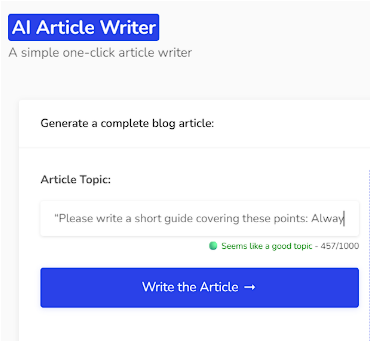
(Image by Ioana)
AI Article Writer
You give it direction. It handles the drafting.
You can also use AI post generators to create visual content like graphics, images, and videos.
What can an AI post generator help with?
An AI post generator can help you create content assets quicker, as long as you guide it well.
You can use an AI writer to:
- Speed up first drafts so you can focus on editing and adding in expertise.
- Repurpose existing content into new formats.
- Beat writer’s block with quick starting drafts.
- Explore different angles, hooks, and tones.
- Turn rough ideas into full blog posts.
- Create clear outlines and structure.
Content creators use it for social media marketing, email marketing, social SEO strategy planning, blogs, and so much more.
8 ways to turn short ideas into full posts with an AI post generator
Here are eight ways you can turn short ideas into full posts with an AI tool. (Stick around until the best practices section, so you can uncover how to make the most of these.)
Note: You likely already have loads of content ideas on your website, landing pages, and blog. Or in your content drafts in Google Docs. These are great resources to pull snippets from. Paste them into the generator and ask the AI to maintain your brand voice.
You’ll see examples of this below.
How-to #1
Instead of asking AI to write directly from a single sentence idea, convert that idea into a simple framework (e.g., three to five key points). Then have AI expand each point into a section. This leads to deeper, more structured posts.
Experiment with a prompt like this:
“Please write a short guide covering these points: [PASTE KEY POINTS]
Then, expand each key point into its own section. For each section: Explain the concept clearly, add a practical example, and include a specific takeaway or action step. Keep the tone conversational, use short sentences, and avoid fluff.”
How-to #2
If you’re in meetings often, you have a goldmine of ideas sitting in your calendar. A pro tip is to leverage your AI meeting assistant as a primary data source. Instead of trying to remember the brilliant point you made during a client strategy session, export the transcript from your assistant and feed it into an AI post generator.
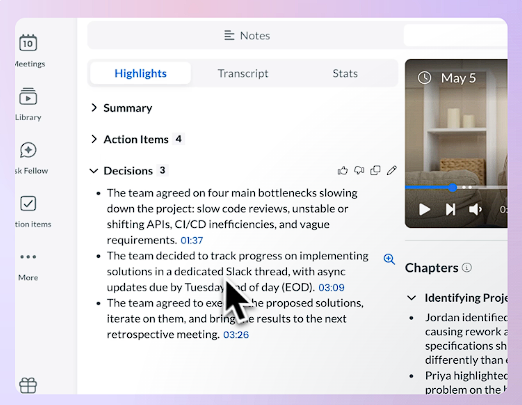
AI Meeting Notes
Try a prompt like this:
“Use the transcript below to create sales-enablement material for my sales team. It should include real language and pain points my client mentioned during the meeting so sales reps understand how to tailor their pitches when speaking to warm leads.”
[PASTE TRANSCRIPT]
How-to #3
Take your idea and map it to a specific audience problem. Don’t say the idea. Spell out who struggles with it and why. Then prompt AI to build a post that walks from problem → cause → solution.
Try prompts like:
“Turn the idea below into a problem-driven carousel I can post on LinkedIn. (Text only. I’ll handle the images myself.)
Idea: [INSERT IDEA]
Target audience: [DESCRIBE AUDIENCE]
Instructions:
- Clearly define the main problem this audience faces.
- Explain why this problem happens (root causes).
- Present the idea as the solution.”
How-to #4
Take a text snippet from your website or landing page and ask the AI to flesh out a blog post outline that supports it.
For instance, you could take the following text snippet about metal buildings (see image below) and have the AI post generate an informative article that explains use cases, highlights durability and cost advantages, and answers common customer questions.
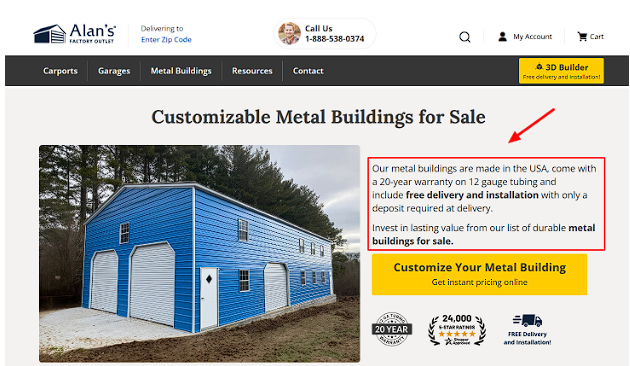
Metal Buildings
Experiment with something like:
“Turn the following website/landing page snippet into a blog post outline.
Snippet:
[PASTE TEXT]
Instructions:
- Identify the core topic and promise in this snippet.
- Create a blog post outline that expands on it.
Include:
- Key use cases or applications.
- Benefits explained in plain language.
- Common questions or objections answered clearly.”
More on how to write better with AI in a bit.
How-to #5
Turn your one-line idea into a strong, opinionated statement. (Not a neutral one. Take a stance.) Then ask AI to defend that position with five supporting arguments, examples, and counterpoints.
Here’s an example prompt:
“Rewrite the idea below into a strong, opinionated blog post.
Idea: [INSERT IDEA]
Instructions:
- Turn this into a bold, clear stance (not neutral).
- Support the stance with five strong arguments.
- Include examples to back up each point.
- Add at least one counterpoint and explain why it’s wrong or incomplete.
- Keep the tone confident, conversational, and direct.”
How-to #6
Break your idea into stages (before, during, after). Then have AI expand each stage with details. This creates a full journey instead of a surface-level explanation. (Great for case studies.)
Try a prompt like this:
“Turn the notes below into a case study.
Notes: [INSERT NOTES]
Structure the post into:
- Before (what happened leading up to this situation).
- During (what happened during and how we helped).
- After (what the results were after working together).
Include numbers in the examples (like how much ROI or MRR we helped the client achieve) and keep the writing practical and easy to follow.”
How-to #7
Give the AI tool some notes comparing two ideas, like GEO vs SEO (see image below), and ask it to create a comparison guide for you.
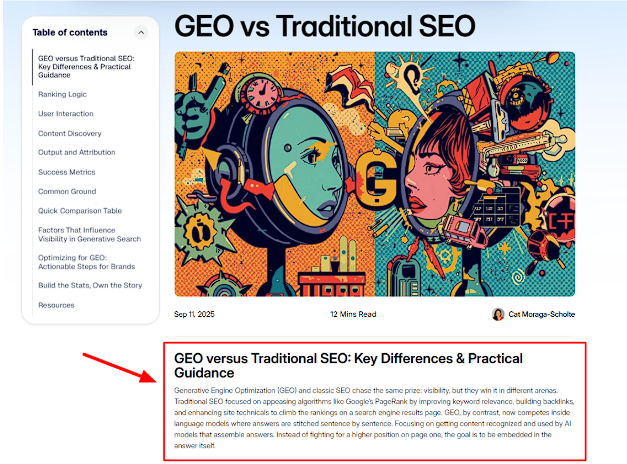
GEO vs SEO
Or use an AI image generator and ask the AI to create visual content that compares both ideas. Could be an infographic, T-chart, or digital poster.
Experiment with a prompt like:
“Create a detailed comparison post using the notes below.
Topic: [IDEA 1] vs [IDEA 2]
Notes:
[PASTE NOTES OR BULLETS]
Instructions:
- Clearly define both concepts.
- Compare them across key areas (use cases, benefits, limitations, outcomes).
- Include a ‘when to use each’ section.
- Give a final recommendation based on different scenarios.
Keep the tone neutral but insightful. Make the comparison easy to scan and helpful for B2B decision-makers.”
How-to #8
Turn a detailed itinerary or roadmap into an informative video.
For example, you could take the following Battle of the Bulge Tour itinerary and paste it into an AI video creation platform and have it create an explainer video. Great for ads, landing pages, and product pages.
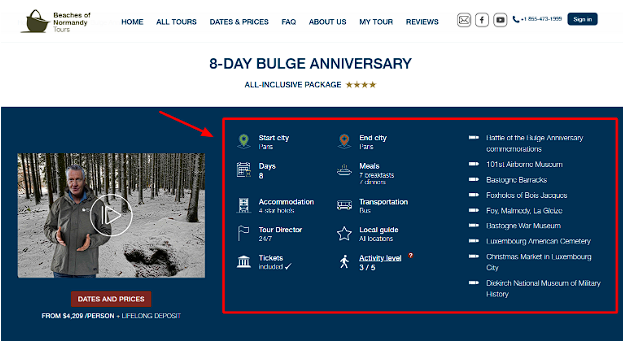
Battle of the Bulge Itinerary
Here’s an example prompt you can try:
“Turn the itinerary below into a structured video script.
Itinerary:
[PASTE ITINERARY]
Instructions:
- Break the content into clear scenes or segments.
- Write a voiceover script for each part.
- Highlight key moments, insights, or selling points.
- Keep pacing tight and engaging.
Please also:
- Suggest on-screen visuals for each segment.
- Include a strong hook at the start and a clear call to action at the end that focuses on [CTA GOAL].
Keep the tone conversational and engaging, not robotic.”
Best practices when using an AI post generator
Prompting is only part of the workflow when working with AI tools. You also need human oversight and editing to make sure content generation stays aligned with brand voice and goals.
Follow these best practices to get the most out of using an AI content generator:
1. Get specific with your content prompts from the start
Your output is only as strong as your input. If your user prompts feel vague, your content will too.
So, spell out what you want.
Define:
- The target audience
- The structure
- The goal
- The tone
The more direction you give the AI writer upfront, the less cleanup you’ll need later.
Think of your prompt as the blueprint. Tight blueprint, stronger post.
2. Use iteration to sharpen the result
Don’t expect the first draft by AI-powered tools to be perfect. That’s not how this works.
Run multiple versions, ask for tweaks and refine sections. Push the AI tool to keep delivering better results. (Your goal is to treat the first output as a starting point, then build on it until it sounds like your brand voice.)
3. Tell the AI what matters and what doesn’t
An AI Assistant won’t automatically know what’s important in your post. You have to guide it.
Make sure to call out your key points, tell it where to go deeper, and flag anything you want cut or simplified.
4. Reinforce context in long-form content
As you build sections, remind the AI content generator about your main angle, tone, and key points. Keep feeding it context so everything stays consistent. It WILL forget.
5. Define your angle so your content doesn’t sound generic
If you don’t tell the AI how to stand out, it won’t.
Be clear about your perspective. What makes your take different? Who are you speaking to? What do you want them to walk away with?
The more specific your angle, the less your content will sound like everybody else’s.
6. Edit and improve the final output
Use your best human judgement and editing expertise to refine the generated text. Compare your final edits against your style guide and high-performing content assets.
Does it stack up? Or does it feel bot-ish? Keep refining it until it sounds brand-aligned and valuable to the target audience.
Wrap up
AI tools are immensely helpful at speeding up content production time. But you’ll need to commit to experimentation, testing, and detailed human editing.
Do that, and you’ll have the best of both worlds: Speed from AI and expertise from humans.
P.S. Need an AI tool that can generate just about anything? You’ll love Writecream.
With Writecream, you’ll get:
- An AI social media post prompt tool
- A YouTube video topic ideas tool
- An AI Instagram post generator
- A YouTube video to article tool
- An image generation tool
- A grammar checker
- An article writer
- A paraphraser
Plus many more AI tools.
What are you waiting for?! Try it for free now.
Join Writecream for FREE!
In just a few clicks and under 30 seconds, generate cold emails, blog articles, LinkedIn messages, YouTube videos, and more.
It's free, forever!
Leave A Comment
Join Writecream for FREE!
In a few clicks and under 30 seconds, generate cold emails, blog articles, LinkedIn messages, YouTube videos, and more — no credit card required.
Start for FREE