

Images. They make websites look alive. But-big images? Slow websites. Nobody likes waiting. So, if you have a bunch of JPG images, and your website feels sluggish? No worries. Let's fix it-with Writecream's JPG to PNG Converter.
How to use JPG to PNG Converter:
Step 1: Resize Before You Upload
A common mistake? Uploading a giant 4000x3000px image when you only need a 1200x800px version. Why? Because bigger images take longer to load. So, first thing:resize.
Use tools like Photoshop, GIMP, or even online options like TinyPNG. Or, better yet-use Writecream's JPG to PNG Converter to adjust size while converting. Just make sure you're not uploading a huge file when a smaller one will do the job just fine.
Step 2: Compress, But Keep It Pretty
Quality matters. But so does speed. Compression is your best friend here. It removes unnecessary data from an image, making it smaller in size. But beware-too much compression can make your image look blurry or pixelated. The trick? Find the sweet spot.With Writecream's JPG to PNG Converter, you can convert your images while maintaining quality. It's free, online, and no login is required. Simple, right?
Step 3: Choose the Right Format
JPG is great for photos. But sometimes, PNG or WebP is better.
When to use JPG?
For Photographs and for images with lots of colors and gradients.
When to use PNG?
For Transparent backgrounds and Sharp-edged graphics (logos, icons, text-heavy images). If you decide PNG is the way to go, you already know where to head-Writecream's JPG to PNG Converter.
Step 4: Optimize Your Image Names & Alt Text
SEO matters. Google doesn't "see- images; it reads file names and alt text.
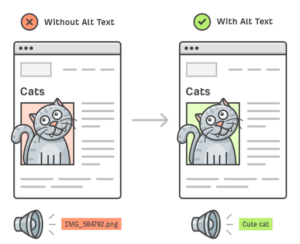
Instead of:
ΠIMG_584792.jpg
Use:
œ… cute-cat.jpg
Also, write meaningful alt text:
œ… A cozy cat in a warm lighting.
Helps with SEO. Therefore, a Win-win.
Step 5: Use a Content Delivery Network (CDN)
A CDN is like a shortcut. Instead of loading images from a single location, it serves them from servers closer to the user. Services like Cloudflare, BunnyCDN, or KeyCDN can make your images load much faster-especially for visitors far from your main server.
Is JPG to PNG converter really required?
A website that loads fast comprises: better user experience + better Google rankings. Before you upload that next JPG,tick the checkboxes:
œ… Resize it.
œ… Compress it.
œ… Choose the right format.
œ… Optimize names & alt text.
œ… Consider a CDN.
And for all your conversion needs, remember-Writecream's JPG to PNG Converter is here to help. Quick, free, no sign-ups needed. Your site won't just look good. It'll feel fast too.
Join Writecream for FREE!
In a few clicks and under 30 seconds, generate cold emails, blog articles, LinkedIn messages, YouTube videos, and more — no credit card required.
Start for FREE