Introduction
To rank on Google, the first and most important step is doing proper keyword research and understanding the SERP. Keyword research helps you discover what people are actually typing into Google, while SERP analysis shows how Google is presenting those results — whether it is blogs, list articles, product pages, or featured snippets.
With the Lexi AI Agent inside the Writecream SEO Editor, this entire process becomes easy and structured. Instead of manually checking multiple tools and websites, Lexi AI scans the top-ranking pages, studies competitor strategies, and identifies the content patterns that perform well. It highlights which keywords are being used, how topics are structured, and what type of content Google prefers for your selected keyword.
This allows you to stop guessing and start creating content based on real data. By following Lexi AI’s insights, you can write articles that match user intent, satisfy search engine requirements, and have a much better chance of ranking higher in search results.
Why Keyword Research & SERP Analysis is Important
- Helps you find the exact keywords that people are actively searching for on Google.
- Allows you to understand how Google is ranking and presenting content for your topic.
- Shows what type of pages are performing well, such as blogs, list articles, or comparison pages.
- Helps you discover new keyword ideas that your competitors may have missed.
- Gives clarity on what users really want so your content can match their expectations.
- Reduces guesswork by helping you make informed content decisions.
- Makes your content more relevant, useful, and easier to rank.
When Should You Do Keyword Research & SERP Analysis?
You should use it:
- Before writing any blog or article, so that your content is based on real search data.
- When your existing content is not ranking on Google and you want to find the reason.
- When choosing a new topic or niche and need to check its search demand.
- When updating old articles to make them more relevant and competitive.
- When you want to clearly understand what users are expecting from your content.
- When checking if the intent is informational, commercial, or transactional
Step-by-Step Guide: How to Start with Lexi AI
Step 1: Open the Writecream SEO Editor
To begin your keyword research and SERP analysis, you first need to open the SEO Editor from your Writecream account.
Follow these steps:
- Log in to your Writecream dashboard
- Go to the SEO Tools section
- Open the Lexi AI Agent & SEO Editor using this link:
👉 https://app.writecream.com/seo-query
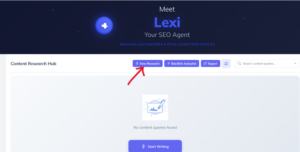
Once the page opens, you will see the Lexi AI interface. This is where your complete keyword research and SERP analysis process starts.
At this stage, you are not creating content yet. You are preparing the base of your article by allowing Lexi AI to study search results, competitors, and keyword data. This ensures that your content is built using properly researched and SEO-relevant keywords.
Step 2: What Lexi AI Agent Does for You
Before you start writing, it is important to understand how the Lexi AI tool supports your work. Lexi AI is not just a writing assistant — it works as a complete SEO research and analysis system that helps you make better content decisions.
Lexi AI helps you by:
- Analyzing top-ranking pages on Google for your keyword
- Studying how competitors structure and write their content
- Understanding what users are actually searching for
- Identifying possible ranking opportunities
- Finding content gaps that you can use to your advantage
- Preparing SEO insights and keyword lists to plan your content
You can think of Lexi AI as your personal SEO strategist that handles competitor checking, keyword research, and SERP analysis for you. It also explains why certain competitor pages are ranking higher, and displays all these insights directly inside the editor.
Step 3: Start Your Keyword Research
To begin using the SEO Editor, you need to start a new keyword research session.
Follow these steps:
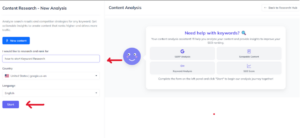
- Click on “New Research”
- Enter your main keyword (example: best AI tools for students)
- Select the country you want to target
- Choose the language for your content
- Click on “Start”
Choosing the correct country and language is very important because Google search results change based on location and language. Lexi AI will analyze the search results of the selected country and study the behaviour of your target audience.
Once you click on start, Lexi AI will begin scanning the top-ranking Google pages for your keyword. It collects important data and insights that help you create content that matches user intent and performs better in search results.
Step 4: How Lexi AI Studies the SERP
Once you start the research, Lexi AI begins analyzing the Google search results. This process usually takes around 2 to 5 minutes, depending on the competition level of your keyword.
Behind the scenes, Lexi AI does the following:
- Scans the top-ranking pages on Google
- Studies the competitor content structure and layout
- Identifies common headings, topics, and keyword usage
- Checks what type of content is currently ranking
- Finds optimization and content gaps
You will see a progress indicator while this analysis is running. During this time, you do not need to take any action — Lexi AI manages everything automatically.
This step is very important because all the next stages, including content writing and optimization, are based on this research. It ensures that your content is created using real, well-researched data instead of guesswork.
Step 5: Check Your Analysis Results
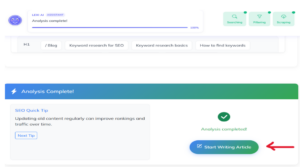
Once the analysis is complete, Lexi AI provides you with a clear overview of the keyword and SERP landscape.
At this stage, you will be able to see:
- Your main keyword along with related keyword suggestions
- Which competitors are ranking for your selected keyword
- What topics and sections they are covering in their content
- What important topics are missing that you can add to your article
- The user search intent for your keyword
This information helps you understand what Google prefers and how you can improve your content to perform better.
You don’t have to remember everything — the SEO Editor will guide you at every step by showing insights and suggestions directly inside the editor.

Step 6: Start Writing Your Content
After reviewing the research results, you will see an option called “Start Writing Article.”
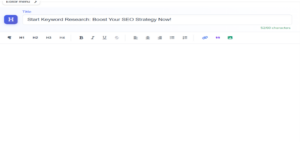
Click on this button to move from the research phase to the SEO Editor writing page. This is where the actual content creation begins.
At this stage:
- AI-generated content is created based on your research
- Your SEO score gets updated in real time
- Optimization suggestions start appearing as you write
By this point, Lexi AI has already done the major research work for you. Now you are creating content using well-researched data, making your article ready to perform better in search results.
Understanding the SEO Editor Layout
Once you enter the SEO Editor, you will notice that it is divided into different sections. Each section has a specific role and helps you create better SEO-friendly content.
Here’s what you’ll see:
-
Editor Area – This is where you write and edit your content.
-
SEO Score Panel – It shows your content’s optimization score in real time.
-
Analysis Tabs – These include keyword analysis, AI writing tools, analytics, and media options.
-
Suggestions Panel – This displays improvement tips based on competitor data.
The most important thing to remember is that the SEO Editor works in real time. As you write or make changes, the SEO score and suggestions update instantly, guiding you step by step to improve your content.
Tips for Best Results
- Always start with proper keyword research so your content is based on real search data.
- Follow the structure and format of top-ranking pages to understand what Google prefers.
- Write in a natural and easy-to-read way instead of writing only for SEO.
- Add useful and meaningful information that genuinely helps your readers.
- Carefully review your content before publishing to check quality, tone, and accuracy.
Mistakes to Avoid
- Skipping keyword research, which leads to creating content without knowing what users are actually searching for.
- Copying competitor content blindly instead of adding your own value and improvements.
- Writing only to increase the SEO score while ignoring the real needs of readers.
- Publishing your content without checking its quality, clarity, and accuracy.
Conclusion
Keyword research and SERP analysis using Lexi AI Agent help you understand exactly what to write and how to write it. Instead of guessing, you get clear insights from real Google data.
With Writecream SEO Editor, you get everything in one place — research, analysis, and writing tools — to create content that ranks.
Start Now
Try the Writecream SEO Editor:
👉 https://app.writecream.com/seo-query
Begin your keyword research today and create content that Google loves 🚀