Understanding SEO Score & Basic Analysis Dashboard
Introduction
Understanding your SEO score and the basic analysis dashboard is a crucial part of creating content that performs well on search engines like Google. Even high-quality content may struggle to rank if it is not properly optimized according to SEO guidelines. The SEO score gives you a clear numerical overview of how well your content is optimized, while the analysis dashboard breaks down the key SEO elements that influence rankings.
With the Lexi AI Agent inside the Writecream SEO Editor, tracking and improving your SEO score becomes simple and transparent. Instead of switching between multiple tools or manually checking SEO factors, Lexi AI analyzes your content in real time and presents insights through an easy-to-understand dashboard. This helps you quickly identify strengths, weaknesses, and opportunities for improvement, allowing you to optimize your content with confidence.
Why SEO Score & Analysis Dashboard Are Important
- SEO score provides a quick snapshot of your content’s overall optimization level.
- Helps you understand whether your content meets basic SEO requirements.
- Highlights missing or weak SEO elements that need attention.
- Saves time by showing all optimization insights in one place.
- Improves content structure, readability, and keyword usage.
- Helps align your content with search engine and user expectations.
When Should You Use the SEO Score & Analysis Dashboard?
You should actively use the SEO score and analysis dashboard:
- While writing new blogs, articles, or landing pages.
- When editing or improving existing content.
- Before publishing to ensure proper optimization.
- When your content is not ranking or getting enough traffic.
- While optimizing content for competitive keywords or niches.
Step-by-Step Guide: How to Use SEO Score & Basic Analysis Dashboard
Step 1: Open the Writecream SEO Editor
To access the SEO score and analysis dashboard, start by opening the SEO Editor from your Writecream account.
Follow these steps:
- Log in to your Writecream dashboard
- Navigate to the SEO Tools section
- Open the Lexi AI Agent & SEO Editor using this link:
👉 https://app.writecream.com/seo-query
Once inside the editor, the SEO score panel and analysis dashboard will be visible and ready to use.

Step 2: Understanding the SEO Score
The SEO score is a numerical indicator that reflects how well your content follows SEO best practices.
The SEO score evaluates factors such as:
- Proper use and placement of target keywords
- Heading and subheading structure
- Content length and topical relevance
- Readability and formatting
- On-page SEO best practices
As you write or edit content, the SEO score updates automatically, helping you track improvements in real time.
Step 3: Understanding the Basic Analysis Dashboard
The basic analysis dashboard provides a detailed breakdown of your content’s SEO performance.
It allows you to:
- See which SEO elements are optimized and which are missing
- Understand keyword usage and placement
- Review content structure and readability
- Identify areas that need improvement
- Follow step-by-step optimization guidance
This dashboard acts as a practical checklist that simplifies the optimization process.
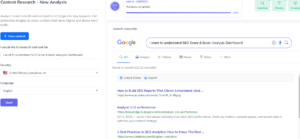
Step 4: How Lexi AI Helps Improve Your SEO Score
Lexi AI continuously monitors your content and provides intelligent suggestions to improve your SEO score.
Lexi AI helps by:
- Highlighting missing keywords or important sections
- Suggesting better heading organization
- Recommending improvements for clarity and flow
- Ensuring content matches search intent
- Providing actionable, real-time SEO insights
This removes guesswork and helps you focus on meaningful improvements.
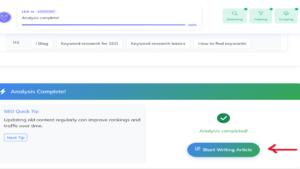
Step 5: Applying Suggestions to Optimize Content
As you write, Lexi AI displays optimization suggestions directly in the dashboard.
These suggestions help you:
- Improve keyword usage naturally
- Add missing headings or topics
- Enhance readability and formatting
- Balance SEO optimization with user experience
Applying these recommendations steadily improves your SEO score and content quality.
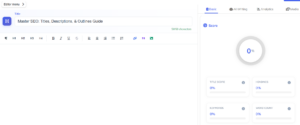
Understanding the SEO Editor Layout
Inside the SEO Editor, you will see several key sections:
- Editor Area – Where you write and edit your content
- SEO Score Panel – Shows your optimization score in real time
- Analysis Tabs – Displays keyword insights and SEO analysis
- Suggestions Panel – Provides optimization tips based on competitor data
All changes and improvements update instantly as you work.
Tips for Best Results
- Use the SEO score as a guideline, not the only goal.
- Focus on writing useful, user-focused content.
- Follow Lexi AI suggestions but keep your writing natural.
- Review the analysis dashboard before publishing.
- Regularly update old content using dashboard insights.
Mistakes to Avoid
- Writing content only to increase the SEO score.
- Ignoring readability and user experience.
- Overusing or stuffing keywords unnaturally.
- Publishing content without checking the analysis dashboard.
- Making unnecessary changes just to raise the score.
Conclusion
Understanding the SEO score and basic analysis dashboard helps you create content that is well-optimized, readable, and aligned with search engine requirements. With the Lexi AI Agent inside Writecream SEO Editor, you get real-time feedback, clear optimization guidance, and actionable insights that make SEO simpler and more effective.
Start Now
Try the Writecream SEO Editor today:
👉 https://app.writecream.com/seo-query
Monitor your SEO score, apply improvements instantly, and create content that ranks with confidence 🚀